
Booking platform for campsites, motorhome sites, marinas and car parks: 31 locations in 15 weeks
EPSIA developed a booking and operations platform for Modusan GmbH, Berlin, covering different kinds of bookable places – from motorhome sites and campsites to tent pitches, marina berths and parking spaces.
Guests book and pay with their own smartphone via a QR code. Operators manage units, services, prices and availability themselves. Each location runs in a technically separate instance with its own database but uses the same software version.
It took 15 weeks from the first customer instance to the 31st location. Today Modusan offers the platform to its own customers as a service.
- 31locations for 20 operators with separate instances
- 15weeks from the first customer instance to the 31st location
- 99,255lines of own code in six repositories
- 874automated tests plus browser tests before rollout
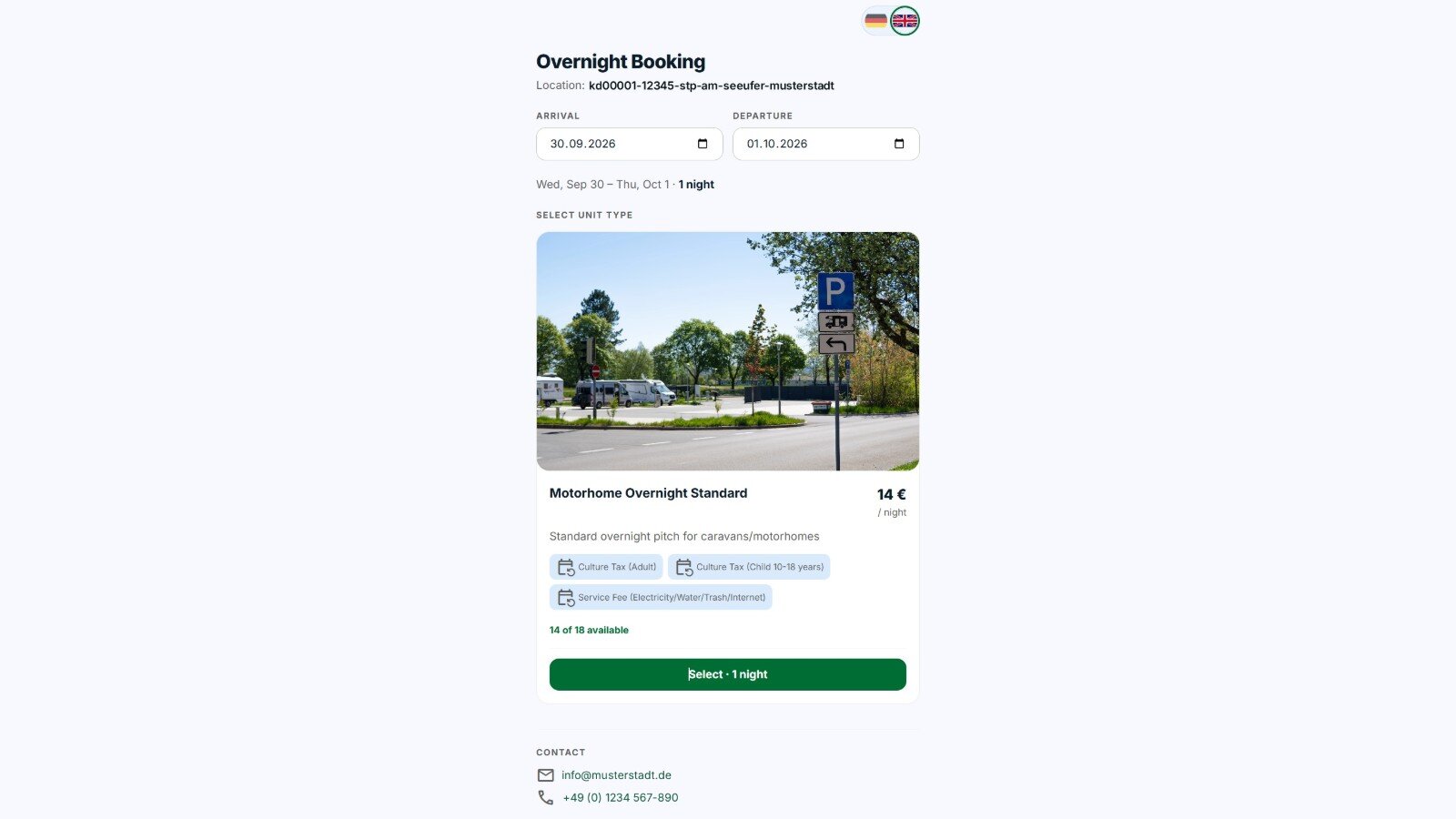
The case study follows the project in seven steps: assignment, architecture, guest booking, operator portal, service catalogue, operation and result.
1 Assignment: One platform for different kinds of bookable places
Modusan needed a platform that is not tailored to a single operator or a particular type of site.
Motorhome sites, campsites, tent pitches, marina berths and car parks differ in their units and services, but need similar basic functions: checking availability, booking, paying, extending and managing.
At the same time, each operator should be able to maintain its own offers and prices. The data and operation of individual locations should remain technically separate from one another.
EPSIA took on the architecture, development and technical operation of the platform. Development began in November 2025 and is carried out under an ongoing development contract.
2 Architecture: Shared applications, separate instances
The platform separates shared applications from the data and services of the individual locations.
The booking frontend for guests, the operator portal and the deployment and operations application are run centrally. Each location, by contrast, gets its own instance for its operational data and processes.
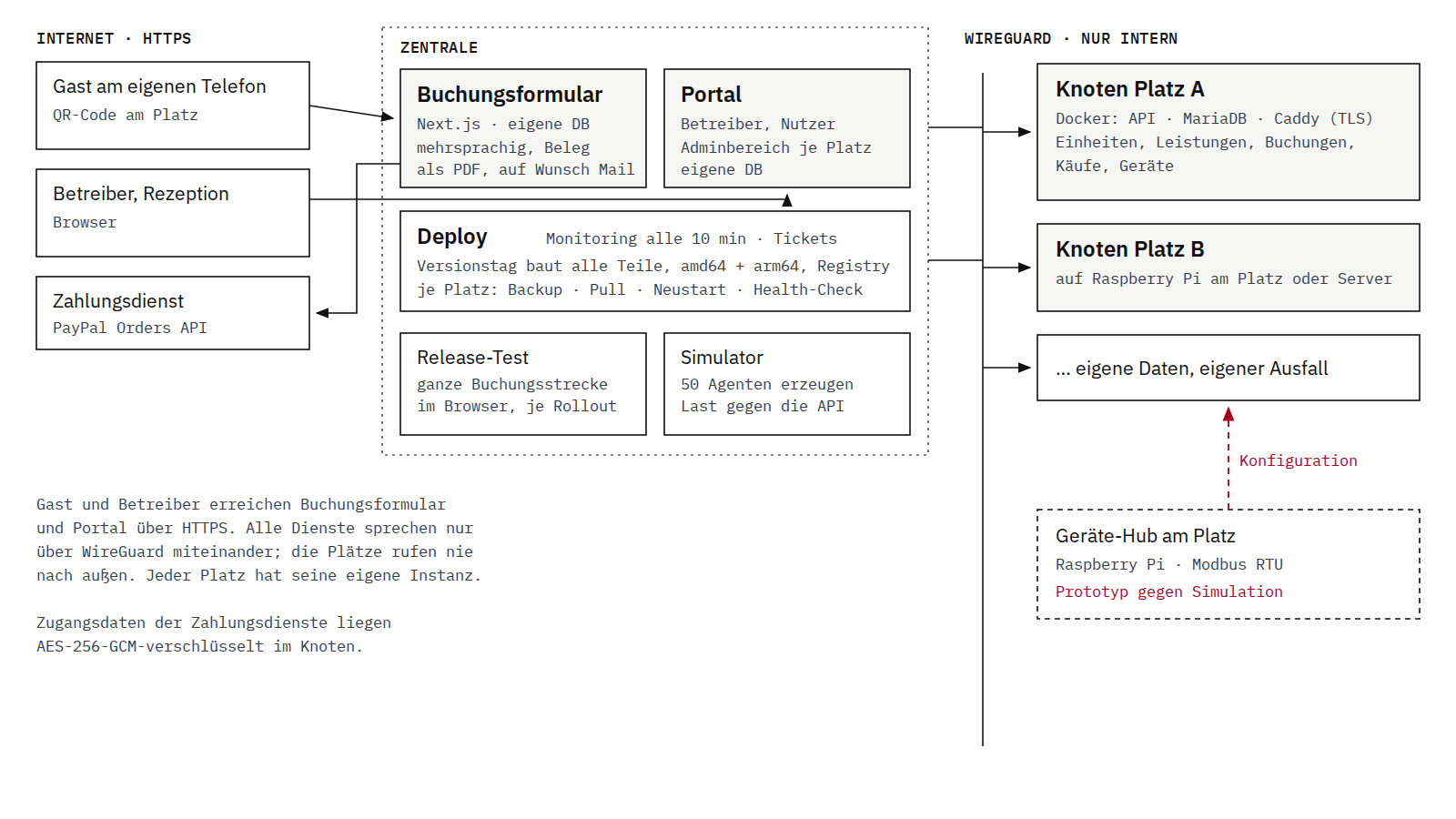
The architecture consists of:
- Booking frontend
- Multilingual Next.js application for guests that serves all connected locations.
- Operator portal
- Central interface for operators and users, with access to the administration area of each location.
- Location instance
- Express API with its own MariaDB database for units, services, bookings, purchases and connected devices.
- Deployment
- Containerised services for amd64 and arm64; instances can run on a Raspberry Pi on site or on central server infrastructure.
- TLS and routing
- Caddy provides the required encrypted services.
- Internal network
- The system components communicate with each other over a secure WireGuard network.
- Payment
- PayPal is integrated as the payment service. Credentials for payment providers are stored encrypted in each instance.
Separating the instances also limits the impact of technical faults: if one location instance cannot be reached, the other locations are not affected.
3 Guest booking: From QR code to access code
At the location, a QR code leads directly to the relevant offer. There the guest sees the available booking options, prices, images and availability.
Depending on the location, this might be short-term parking, an overnight stay on a pitch or the booking of a specific unit.
The booking process covers:
- Selecting
- The guest chooses the period or length of stay, the unit type and available extras. Required details such as the vehicle registration number are captured and validated during the booking process.
- Checking
- The platform determines availability and the total price based on the rules and services of the location.
- Paying
- Once the required consents have been given, payment is made via the connected payment service.
- Confirming
- After successful payment, the location instance confirms the booking, records the purchase and generates a four-digit access code.
- Receipt
- The booking details can be output as a PDF and optionally sent by email.
- Extending
- Using the access code and registration number, the guest can call up an existing stay and – if available – book further nights or services. The existing access code remains valid.
Life cycle of a booking
The platform maps the entire life cycle of a booking through defined states: provisional, reserved, confirmed, active and closed.
Scheduled processes keep these states up to date automatically:
- Unpaid provisional bookings are closed after a configurable period.
- Confirmed bookings are activated at the start of the stay.
- Bookings whose start date has passed without successful confirmation are closed.
- After the end of the stay, the booking is ended automatically.
- Occupancy checks prevent overlapping bookings of the same unit.
- Transactions are processed so that the same purchase is never recorded more than once.
4 Operator portal: Managing bookings, occupancy and operation
Each location has an administration area in the operator portal.
There, staff can, for example, create bookings for guests on site, search for existing stays by registration number or access code, extend bookings and view arrivals and departures.
The range of functions also includes:
- occupancy calendar
- availability and blocked periods
- overview of current arrivals and departures
- master data and unit types
- services and prices
- configuration of payment providers including a connection test
- device management
- backups
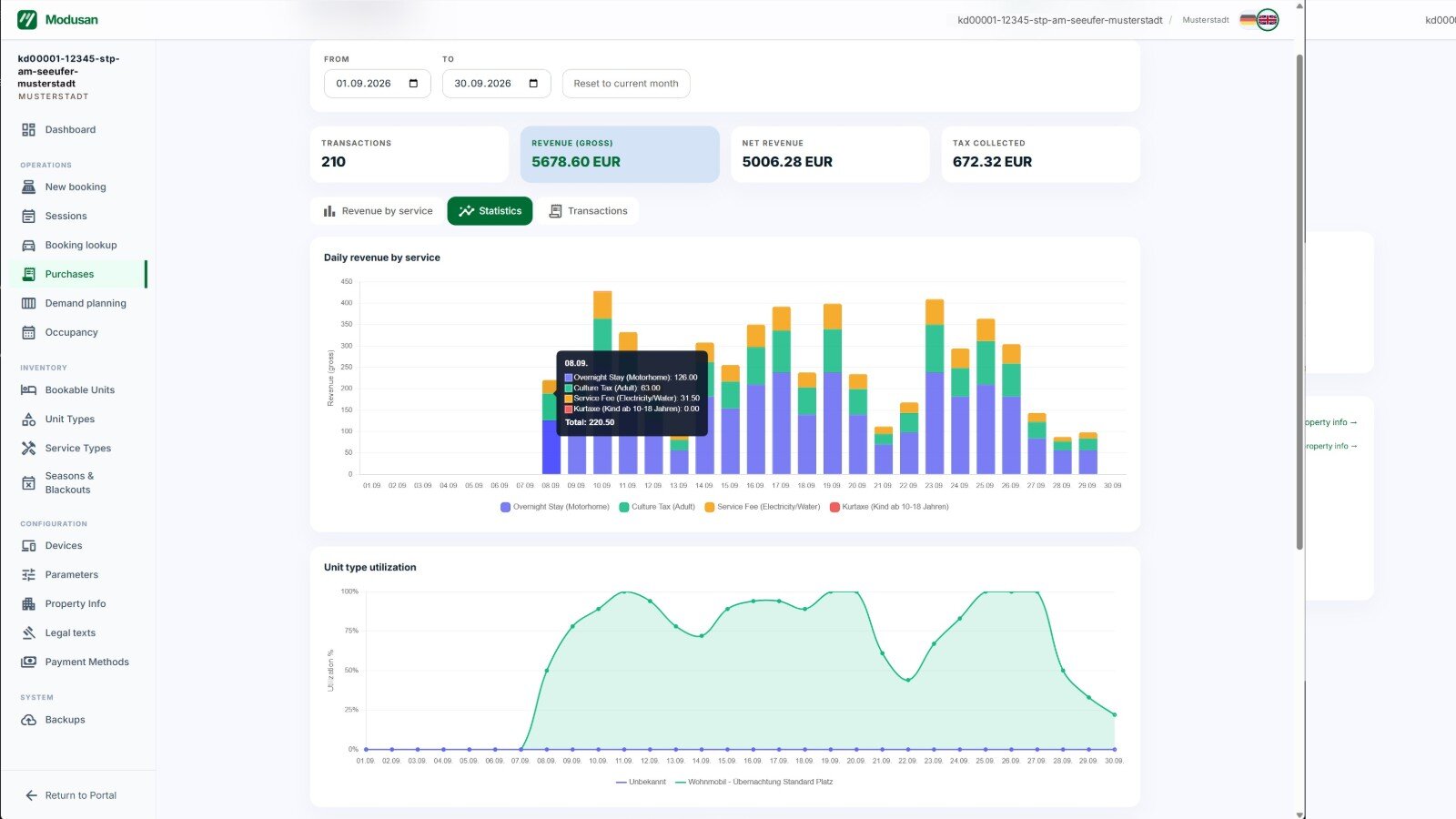
- revenue and transaction reports
- occupancy by unit type
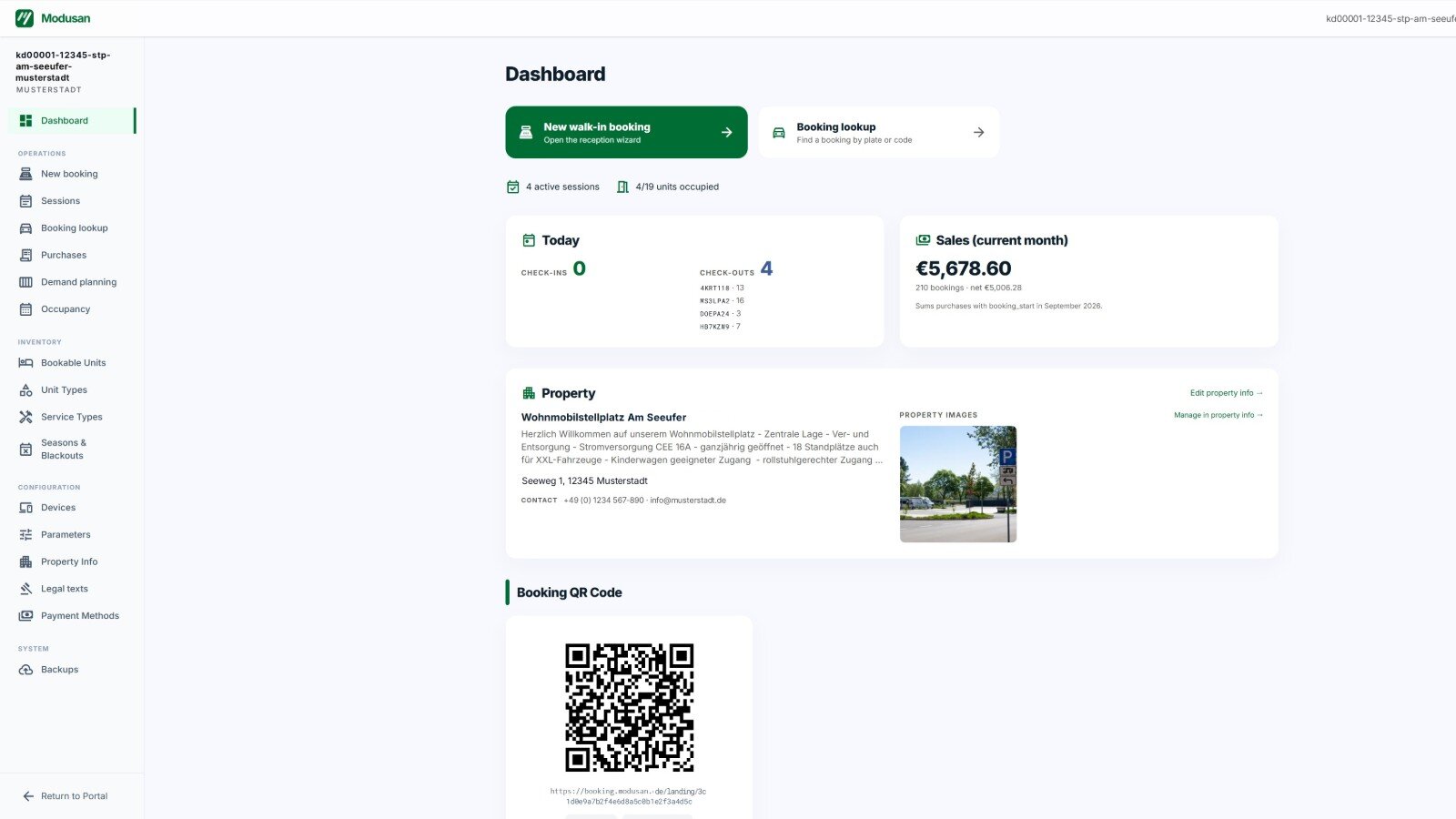
The reports show, among other things, monthly revenue and tax shares, daily revenue by service and the occupancy of different unit types.
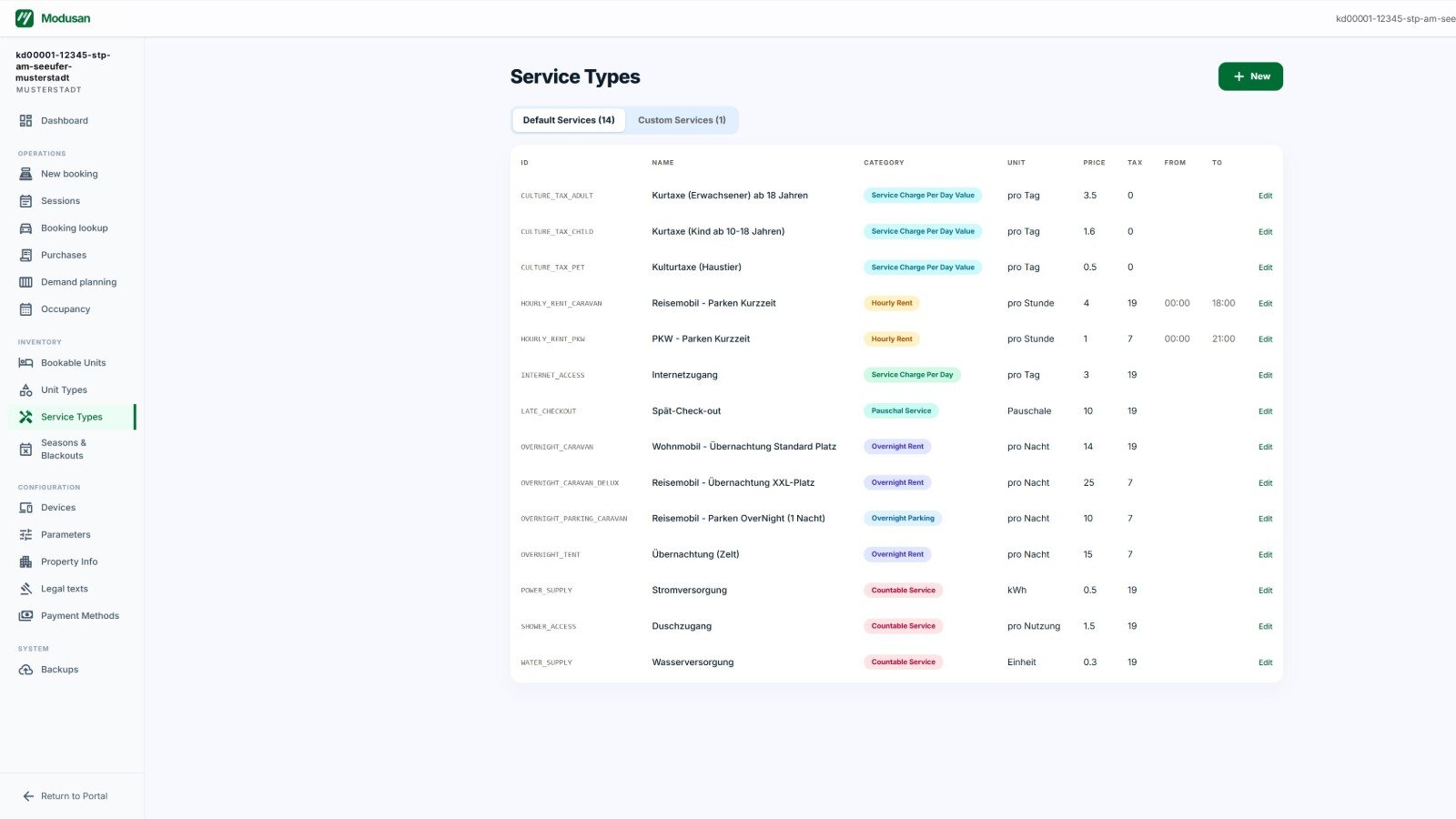
5 Service catalogue: The operator defines the business model
A key part of the platform is not hard-coded for camping or motorhome sites.
Operators can create their own unit types – for example standard pitch, XXL pitch, tent pitch, berth or car parking space. They can also define their own services with price, tax rate, quantity limits and time rules.
These can include, for example:
- overnight stays
- short-term parking
- electricity
- showers
- late checkout
- internet access
- per-person charges
- automatically assigned services
Prices are calculated using defined billing types. These include, among others:
- per night
- price × number of nights
- per hour
- price × hours, optionally within a permitted time window
- flat rate
- one-off amount
- by quantity
- price × number or amount consumed
- daily rate
- price × days of stay
- daily rate × quantity
- for example days of stay × persons × price
- automatic
- service is assigned to a booking without separate selection
From these, an operator combines the units, services and rules needed for its location.
As a result, a new location can in many cases be configured and rolled out instead of requiring its own software version.
6 Operation: Rolling out one software version to many instances
EPSIA runs a central build and deployment process for the platform.
A common release covers the API, booking frontend, operator portal and other services. The required images are built for amd64 and arm64 and provided in a dedicated registry.
The deployment application then rolls out a new version in a controlled way: first the central services, then the individual location instances.
For a location instance, the process includes:
- data backup
- provision of the new version
- restart of the services
- health check
- database schema check
New locations are set up using the same process.
Automated checks before rollout
Before delivery, the platform passes through automated checks:
- 874 automated tests in the repositories
- browser tests for key user flows
- a release test of the complete booking flow
- health checks after deployment
During operation, a monitor checks the instances regularly and produces a daily summary. Faults can be followed up via the integrated ticket system.
For load and functional testing there is also a simulator that generates booking traffic against the API with up to 50 simulated participants.
EPSIA also uses AI tools in development. Regardless of this, every change must pass the same architecture rules, automated tests and release checks before it is rolled out.
Scope of the platform
- Own code
- 99,255 lines in six repositories — deployment application 38,834, booking frontend 17,514, operator portal 17,108, API 15,944, device hub 7,529, simulator 2,326
- Tests
- 874 automated tests in 104 test files plus browser tests
- Changes
- 742 commits between November 2025 and September 2026
7 Result: From the first customer instance to 31 locations in 15 weeks
The first customer instance of the platform went live on 12 May 2026. On 27 August 2026 the 31st location was set up – a period of 15 weeks.
- 31 locations for 20 operators use the same software base.
- Each location has a technically separate instance with its own database.
- New locations can be set up through configuration and the existing deployment process.
- Guests can book, pay and extend existing stays themselves.
- Operators manage units, services, prices and availability without software changes.
- Modusan offers the platform as a service to its own customers.
The platform continues to be developed. A device hub for direct connection to local utility equipment is already being tested against a Modbus simulation. It is not yet part of the live customer locations.
What does this project stand for?
The project shows how EPSIA turns a specialised business process into a reusable software platform.
Units, services, prices and operational rules are configurable, while all locations remain on the same software base. Technically separate instances isolate operators and locations from one another; a common build, test and deployment process still allows central further development.
The platform thus combines a specialist application, multi-site operation and automated software operations in one system.
How does a specialist application project start with EPSIA?
A specialist application project can start at EPSIA with a requirements analysis at an agreed fixed price.
EPSIA analyses business processes, data, user roles, interfaces and the requirements for later operation. The result is described in a functional specification in such a way that the scope and technical structure of the subsequent development can be reliably defined.
On this basis, EPSIA can offer the implementation as a fixed-price project.
More about this service under Specialist applications for specialised business processes.
Key facts
- Customer
- Modusan GmbH, Berlin
- Service
- Specialist applications
- Application
- Booking and operations platform for campsites, motorhome sites, marinas and car parks
- Period
- since November 2025, ongoing
- Technology
- TypeScript, Node.js, Express, Next.js, React, Prisma, MariaDB, Docker for amd64/arm64, Caddy, WireGuard, PayPal, Playwright, Jest, C++/Qt.